The following is the cause of this error:
The values of a scalar datatype such as CHAR or REAL have a predefined order, which allows them to be compared.
But an object type, such as a some_type, which can have multiple attributes of various data types, has no predefined axis of comparison.
To be able to compare and order variables of an object type, you must specify a basis for comparing them.
Two special kinds of member methods can be defined for doing this: map methods and order methods.
The action you can take to resolve this issue: Define a MAP or ORDER method for the object type.
For more information, you can see https://docs.oracle.com/cd/B19306_01/appdev.102/b14260/adobjbas.htm#sthref211
Monday, 4 December 2017

Wednesday, 29 November 2017
ORA-02030 error when try to grant permissions to a v$ tables
Face with an error ORA-02030 when you try to give permission on a v$ view
SQL> grant select on v$session to hr;
grant select on v$session to hr
*
ERROR at line 1:
ORA-02030: can only select from fixed tables/views
Why it couldn’t give select privileges to a v$ view. If you tried to give permission to other v$views you will face same the error.
The problem is caused because of trying to give select privileges on a synonym. Oracle v$ views are named V_$VIEWNAME and they have synonyms in format V$VIEWNAME and you can’t give privilage on a synonym.
If you want to give permission to a V$ view you must grant permissions like below:
SQL> grant select on v_$session to hr;
Grant succeeded.
SQL> grant select on v$session to hr;
grant select on v$session to hr
*
ERROR at line 1:
ORA-02030: can only select from fixed tables/views
Why it couldn’t give select privileges to a v$ view. If you tried to give permission to other v$views you will face same the error.
The problem is caused because of trying to give select privileges on a synonym. Oracle v$ views are named V_$VIEWNAME and they have synonyms in format V$VIEWNAME and you can’t give privilage on a synonym.
If you want to give permission to a V$ view you must grant permissions like below:
SQL> grant select on v_$session to hr;
Grant succeeded.
Wednesday, 15 November 2017
RAISE_APPLICATION_ERROR
The RAISE_APPLICATION_ERROR is actually a procedure defined by Oracle that allows the developer to raise an exception and associate an error number and message with the procedure. This allows the application to raise application errors rather than just Oracle errors. Error numbers are defined between -20,000 and -20,999. All other numbers belong to Oracle for its own errors. The message can be anything that will fit in a varchar2(2000).
RAISE_APPLICATION_ERROR can be used in either (or both) the executable section and the exception section of a PL/SQL program. The error number and message is displayed to the user.
Syntax:
RAISE_APPLICATION_ERROR ({error_number}, {error_message});
{error_number} - The Error number must be between -20000 and -20999
{error_message} - The Error message is the message you want to display when the error occurs
Using in Execution section
BEGIN
...
RAISE_APPLICATION_ERROR (-20001,'This is a user error message');
...
END;
Using in Exception section:
BEGIN
...
EXCEPTION
WHEN NO_DATA_FOUND THEN
RAISE_APPLICATION_ERROR (-20003, 'This is another user error message');
END;
Examples:
Input:
DECLARE
l_number NUMBER;
BEGIN
SELECT 2 INTO l_number FROM DUAL;
dbms_output.put_line('l_number = '||l_number);
END;
Output:
l_number = 2
Input:
DECLARE
l_number NUMBER;
BEGIN
SELECT 2 INTO l_number FROM DUAL;
RAISE_APPLICATION_ERROR (-20001,'This is a user error message');
dbms_output.put_line('l_number = '||l_number);
END;
Output:
There is no output due to our ERROR
line 19: ORA-20001: This is a user error message
ORA-06512: at line 5
RAISE_APPLICATION_ERROR can be used in either (or both) the executable section and the exception section of a PL/SQL program. The error number and message is displayed to the user.
Syntax:
RAISE_APPLICATION_ERROR ({error_number}, {error_message});
{error_number} - The Error number must be between -20000 and -20999
{error_message} - The Error message is the message you want to display when the error occurs
Using in Execution section
BEGIN
...
RAISE_APPLICATION_ERROR (-20001,'This is a user error message');
...
END;
Using in Exception section:
BEGIN
...
EXCEPTION
WHEN NO_DATA_FOUND THEN
RAISE_APPLICATION_ERROR (-20003, 'This is another user error message');
END;
Examples:
Input:
DECLARE
l_number NUMBER;
BEGIN
SELECT 2 INTO l_number FROM DUAL;
dbms_output.put_line('l_number = '||l_number);
END;
Output:
l_number = 2
Input:
DECLARE
l_number NUMBER;
BEGIN
SELECT 2 INTO l_number FROM DUAL;
RAISE_APPLICATION_ERROR (-20001,'This is a user error message');
dbms_output.put_line('l_number = '||l_number);
END;
Output:
There is no output due to our ERROR
line 19: ORA-20001: This is a user error message
ORA-06512: at line 5
Wednesday, 30 August 2017
Oracle File extensions
SQL*Plus files
.sql - SQL script
.lst - spool file
PL/SQL files
.pls - PL/SQL source
.plb - PL/SQL binary
.pks - Package source or package specification
.pkb - Package binary or package body
.pck - Combined package specification plus body
Oracle database files
.dbf - database file
.log - Online Redo Log
.rdo - Online Redo Log
.arc - Archive log
SQL*Loader files
.ctl - Control file
.dat - Data file
.bad - Bad file
.dsc - Discard file
SQL*Net files
.ora - tnsnames.ora, sqlnet.ora, etc.
Forms files
.fmb - Forms binary
.fmt - Forms text
.fmx - Forms executable
Reports files
.rdf - contains a single report definition in binary format.
.rdf files are used to both run and edit reports.
.rep - contains a single report definition in binary format.
.rep files are used solely to run reports; you cannot edit a .rep file
.rex - contains a single report definition in text format. .REX files are portable.
Tuesday, 29 August 2017
Switching to a Different Schema
The following statement sets the schema of the current session to the schema name specified in the statement.
ALTER SESSION SET CURRENT_SCHEMA = <schema name>;
In subsequent SQL statements, Oracle Database uses this schema name as the schema qualifier when the qualifier is omitted. In addition, the database uses the temporary tablespace of the specified schema for sorts, joins, and storage of temporary database objects. The session retains its original privileges and does not acquire any extra privileges by the preceding ALTER SESSION statement.
You can use this command above to avoid the use of public synonyms. By setting the CURRENT_SCHEMA attribute to the schema owner name it is not necessary to create public synonyms for production table names. Without the current_schema syntax, you would have to assign a public synonym for every table in your production database.
If you want to check the current schema of the session you can use the following statement:
SELECT sys_context( 'userenv', 'current_schema' ) from dual;
Let's look in the following example:
CONNECT user1
ALTER SESSION SET CURRENT_SCHEMA = schema_2;
SELECT * FROM empoyers;
Because user1 is not schema-qualified, the table name is resolved under schema schema_2. But if user1 does not have select privilege on table schema_2.empoyers, then user1 cannot execute the SELECT statement even switching the current session schema.
Monday, 28 August 2017
Useful options that you should know about SQL Developer
1. Search Preferences
You can easily navigate to any of SQL Developer preferences simply start typing the name of it in the search box. DO NOT HIT ENTER, this will close the preferences dialog with hit “OK” button.


4. Hiding Database Object Types from your Connection Trees
You probably don’t work with EVERYTHING in Oracle – so set your trees to show just what you need. Less scrolling, less searching. More happy

5. Connection Script Startup
You can setup your connection startup script (LOGIN.SQL) under Database. The contents of the script will be executed every time when the database connection is established.

You can easily navigate to any of SQL Developer preferences simply start typing the name of it in the search box. DO NOT HIT ENTER, this will close the preferences dialog with hit “OK” button.

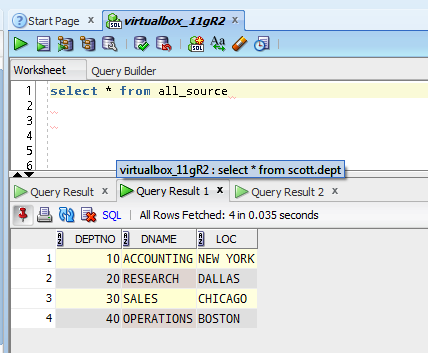
2. Database – Worksheet – Show Query Results in new tabs
Wouldn’t it be nice to keep around query results from different iterations of your query as you work through it? Enabling this feature will keep your query results open as you execute new queries. You can turn on/off with the feature with hit the red pin under ‘Query Result’. Mouse over the ‘Query Result’ labels to see the SQL statement used to populate that grid. Of course, the more result sets you leave open, the more memory SQL Developer will need. So be sure to close them when you’re finished.
3. Open Object on Single Click
Good for n00bs, probably annoying to experienced users.

You probably don’t work with EVERYTHING in Oracle – so set your trees to show just what you need. Less scrolling, less searching. More happy

You can setup your connection startup script (LOGIN.SQL) under Database. The contents of the script will be executed every time when the database connection is established.

Monday, 14 August 2017
ROWID vs. UROWID in Oracle DB
Each row in the database has an address. The following describe the two forms of row address in an Oracle Database - rowid and urowid.
ROWID Data Type
The rows in heap-organized tables that are native to Oracle Database have row addresses called rowids. You can examine a rowid row address by querying the pseudocolumn ROWID. Values of this pseudocolumn are strings representing the address of each row. These strings have the data type ROWID. You can also create tables and clusters that contain actual columns having the ROWID data type. Oracle Database does not guarantee that the values of such columns are valid rowids. Refer to Chapter 2, "Pseudocolumns" for more information on the ROWID pseudocolumn.
Rowids contain the following information:
ROWID Data Type
The rows in heap-organized tables that are native to Oracle Database have row addresses called rowids. You can examine a rowid row address by querying the pseudocolumn ROWID. Values of this pseudocolumn are strings representing the address of each row. These strings have the data type ROWID. You can also create tables and clusters that contain actual columns having the ROWID data type. Oracle Database does not guarantee that the values of such columns are valid rowids. Refer to Chapter 2, "Pseudocolumns" for more information on the ROWID pseudocolumn.
Rowids contain the following information:
Subscribe to:
Posts (Atom)